Best Golf Simulator Under $1,000 (2026)
The best golf simulator under $1,000 for 2026, anchored by the Garmin Approach R10 with a budget projector, impact screen, and mat for real projected play at home.
The best golf simulator under $1,000 is built around the Garmin Approach R10, the budget radar launch monitor that reads speed, spin, and launch and plays virtual courses through the Garmin Golf app. Add a HAPPRUN 1080p projector, an aikeec impact screen, and a GoSports Elite mat and you land near $800 for a genuinely playable projected setup. This is the first budget where a true screen-and-projector simulator becomes realistic. Here are six real components and how to combine them.
Best Golf Simulator Gear Under $1,000

Garmin Approach R10 Portable Launch Monitor
The budget radar darling that reads club and ball speed, spin, and launch and runs virtual courses through the Garmin Golf app.

HAPPRUN 1500-Lumen Full HD Smart Projector
An affordable 1080p projector bright enough for a dim room, the simplest way to put a virtual course on a screen at this budget.
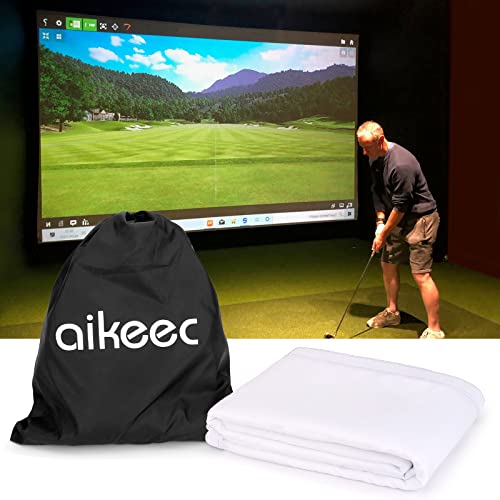
aikeec Golf Simulator Impact Screen 10 x 10 ft
A 7 mm ultra-clear impact screen with 32 grommets that doubles as your hitting surface and projection display.

GoSports Golf Hitting Mat - Elite 5 x 5 ft
A 15 mm artificial-turf mat with three rubber tees that gives a stable, joint-friendly stance for full-swing practice.

GoSports 10 ft x 7 ft Golf Practice Hitting Net
A steel-frame net for owners who want a net-only build instead of a projector, or a backup target beside the screen.

Rapsodo Mobile Launch Monitor (iPhone/iPad)
A cheaper radar alternative that pairs with an iPhone or iPad for shot data, a video tracer, and basic range modes.
Crossing the $1,000 line changes the experience. Under $500 you watch numbers on a phone; here you can project a virtual course onto a screen and actually see your ball fly toward a target. The Garmin R10 does the heavy lifting as the launch monitor, and the rest of the budget goes to a value projector, an impact screen that also catches the ball, and a stable mat. It is not a luxury enclosure, but it is a real, immersive home simulator you can play for hours.
Quick comparison
| Product | Role | Best for | Price |
|---|---|---|---|
| Garmin Approach R10 | Launch monitor | Best overall anchor | $399.98 |
| HAPPRUN 1080p Projector | Projector | Budget projected play | $129.94 |
| aikeec 10x10 Screen | Impact screen | Hitting and display surface | $96.39 |
| GoSports Elite 5x5 Mat | Hitting mat | Stable full-swing stance | $179.99 |
| GoSports 10x7 Net | Hitting net | Net-only alternative | $129.99 |
| Rapsodo Mobile | Launch monitor | Cheaper monitor option | $199.98 |
Prices on Amazon move around, so use these as a snapshot and total your own parts in the golf simulator cost calculator.
The complete build at $1,000
Here is the math on the recommended projected setup: Garmin R10 at about $400, HAPPRUN projector around $130, aikeec 10 by 10 ft screen near $96, and the GoSports Elite mat at $180. That is roughly $806, leaving headroom for HDMI cables, a stand or mount, and golf balls. The R10 is the centerpiece because it is the most accurate launch monitor you can buy at this tier and because its software library makes the screen worth projecting onto. Everything else supports that core.
Garmin Approach R10 (the anchor)
The R10 is a radar launch monitor that measures club head speed, ball speed, spin, and launch angle, then feeds that into Garmin's Home Tee Hero and Garmin Golf apps for virtual rounds on thousands of courses. It is portable, lasts up to 10 hours per charge, and works indoors or out. Because it reads ball flight with radar, give it a few feet of space between the tee and the screen so it can track each shot cleanly. For under $1,000 it is the clear anchor and the reason this build feels like a real simulator.
Projector and screen
The HAPPRUN is a full HD projector that is bright enough for a dim garage or basement and cheap enough to leave room in the budget for a good mat. It is not a short-throw model, so mount it on the ceiling or behind the hitting area to avoid casting your shadow on the screen. The aikeec 10 by 10 ft impact screen is your two-in-one piece: it catches the ball and shows the projected image. If your room is bright, plan for blackout shades, because budget projectors fade fast against ambient light.
Mat, net, and the value monitor
The GoSports Elite 5 by 5 ft mat gives a stable, joint-friendly stance with three included tees, and at 15 mm it handles daily driver work. If projection is not a priority, skip the projector and screen and run a net-only build with the GoSports 10 by 7 ft net, which is simpler and easier to stow. And if you want to drop the monitor cost, the Rapsodo Mobile Launch Monitor pairs with an iPhone or iPad for shot data and a video tracer at half the R10's price, though it does without the deeper course library.
How we chose
We did not hit balls into these products ourselves or run them in a lab. We compared published specifications, including the R10's measured metrics and software support, projector brightness and resolution, screen material and grommet count, and mat thickness, then weighed those specs against patterns in verified owner reviews on Amazon. We prioritized the launch monitor because it determines accuracy and software, and we were honest about budget projector limits like throw distance and brightness so the projected build meets real expectations.
Buying tips
Confirm your space first. You want roughly 10 ft wide, 12 ft deep, and a ceiling near 9 ft, and you should test your own full driver swing before buying anything; our room size calculator and projector throw calculator nail the geometry. Spend on the launch monitor first, then decide between a screen build and a net build. For deeper monitor options see our best launch monitors under $1,000, for full packages see the best budget golf simulators, and for net-only setups see the best golf simulator nets.
Golf Sim Build Planner
Room-fit worksheet, gear checklist, budget tracker, and wiring and lighting plan, in one printable planner that takes your build from idea to first swing.
Frequently Asked Questions
What is the best golf simulator under $1,000?
The strongest build pairs the Garmin Approach R10 with a budget 1080p projector, an aikeec impact screen, and a GoSports Elite mat for roughly $800. The R10 is the anchor: a radar launch monitor that reads speed, spin, and launch and plays virtual courses through the Garmin Golf app. The projector and screen turn your numbers into a playable picture on the wall. It is the first budget tier where a true projected simulator becomes realistic.
Is the Garmin R10 worth it for a home simulator?
Yes, the R10 is the budget radar darling for good reason. It captures club head speed, ball speed, spin, and launch angle, then drives simulator play and virtual rounds through Garmin software. It is portable, runs up to 10 hours on a charge, and works indoors or on the range. It is not as precise as a photometric unit costing several times more, but for the money it is the best on-ramp to a real projected home simulator.
Can I get a projector and screen under $1,000?
Yes, if you keep the launch monitor near $400 and pick value gear for the rest. A budget 1080p projector around $130 and a 10 by 10 ft impact screen near $100 leave room for a quality mat. The trade-off is brightness and a longer throw: budget projectors are not short-throw, so plan for ceiling or rear mounting to avoid shadows. For a dedicated dim room the picture is genuinely enjoyable.
How much space do I need for this build?
Aim for about 10 ft of width, 12 ft of depth, and a ceiling near 9 ft for a comfortable full swing, with 10 ft of ceiling ideal. The R10 is a radar monitor, so it wants a few feet of ball flight between the tee and the screen to read each shot well. Always test your own driver swing in the room first. Our room size and projector throw calculators confirm the numbers before you commit.
Net or impact screen at this budget?
Choose a screen if you want to see projected courses and a net if you only want feedback and reps. A net-only build with the R10 and a GoSports net is simpler, cheaper, and easier to put up and take down. A screen build costs more and needs a projector and a darker room, but it gives you the immersive course view that makes simulator golf fun. Both are valid; it depends on whether projection matters to you.
What software runs on a sub-$1,000 setup?
The Garmin R10 plays its own Home Tee Hero and Garmin Golf experiences with thousands of virtual courses, and it can connect to third-party platforms like E6 Connect and Awesome Golf depending on the plan. The Rapsodo Mobile unit uses Rapsodo's app with simpler range and course modes. Most premium subscriptions are extra, so factor a monthly or annual fee into your budget if you want the full course library.
Building a golf sim?
Use our free calculators and guides to size the room, the gear, and the budget.
Build Planner: $39