The Golf Sim Build Planner
8 printable worksheets to take your golf simulator from empty room to first swing: a room-fit planner, gear checklist, budget tracker, launch monitor decision sheet, projector and screen plan, and a build timeline.
One-time purchase. Instant download. Print as many copies as you need.
A great sim is built on a plan, not a pile of boxes
Whether your room can actually fit a full driver swing. Which launch monitor suits your space, your lighting, and your budget. How far back the projector has to sit to fill the screen without catching your backswing. What the whole thing will really cost once the mat, screen, enclosure, computer, and software are added up. Any one of those is easy to get wrong, and a single wrong call (a monitor that needs more depth than you have, a projector that throws a shadow on every swing) can mean returns, rework, and a half-finished room.
A golf sim build goes sideways quietly. The ceiling turns out an inch too low for a driver, the screen is sized for the wrong width, the budget creeps past the number you set, the gear arrives in the wrong order and sits in boxes. None of it announces itself until you are mid-build, and by then the fixes are expensive.
This planner gives you one clear place to plan all of it, so you measure once, buy the right gear, and build it in the right order, from empty room to first swing.
What's inside
8 printable worksheets designed specifically for home golf sim builders, from the first measurement to a dialed-in, finished room.
Room & Space Worksheet
Record your width, depth, and ceiling height, run the fit check, and map your swing clearance and screen standoff. Get the room right first and every gear and layout decision after it falls into place.
Gear Checklist
Every component in one list: launch monitor, projector, impact screen, enclosure, mat, computer, software, mounts, and cables. Check off what you have, what you need, and what can wait, so nothing gets forgotten on build day.
Budget Tracker
Line up your target and actual cost for each component with a running total. See exactly where the money is going, catch creep early, and keep the whole build inside the number you set.
Launch Monitor Decision Worksheet
Photometric or radar, must-have data points, software compatibility, and your room constraints, scored against a shortlist. Buy the right monitor for your space and game the first time instead of guessing.
Projector & Screen Plan
Work out throw distance from your screen width and throw ratio, set your mount height, and size the screen to the bay. The page that stops shadows and off-center images before you drill a single hole.
Wiring & Power Plan
Map outlets, HDMI runs, surge protection, and the lighting circuit before you build. Plan the power once and you avoid extension-cord spaghetti and a dim, badly lit room later.
Build Timeline & Task List
A phase-by-phase plan from empty room to first swing: prep, mount, hang, wire, calibrate, and play. Break the project into clear steps so it actually gets finished, not half-built for six months.
Maintenance & Calibration Log
Track screen and mat wear, calibration checks, and software updates so your numbers stay honest and your gear lasts. A few minutes logged keeps the sim playing like the day you built it.
Know exactly what to buy
The planner tells you how to size and order each component. Here is the top-rated gear our guides recommend to fill it, ready to shop.
Top-rated gear to build your sim
The essentials our guides recommend, ready to shop.
-
 Launch monitor Garmin Approach R10 Portable Golf Launch Monitor
The budget radar that made home launch data real: reliable club and ball speed, launch angle, and app-based play for well under $500.
-
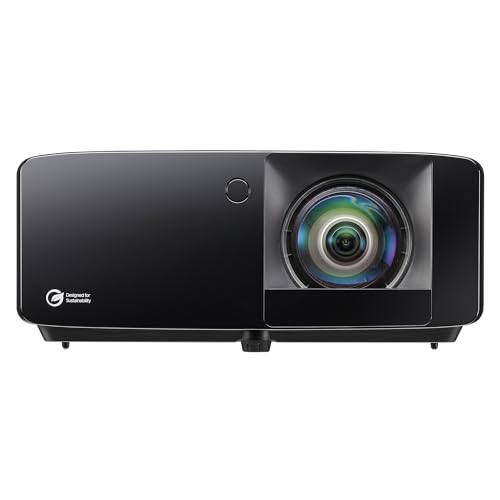 Projector Optoma GT2400HDR Short Throw Laser Projector
A golf-ready 1080p laser with 4,200 lumens and a short 0.5 throw ratio, bright enough to fill a wide screen from a close ceiling mount.
-
 Enclosure + screen GoSports 10x8 ft Enclosure with HD Impact Screen
An all-in-one bay with a steel frame, blackout panels, and a commercial-grade HD impact screen, ready to hang and hit into.
-
 Hitting mat Real Feel Golf Mats Country Club Elite 4'x5' Golf Mat
Dense commercial nylon turf that lets the club slide through and takes a real tee anywhere, easy on the wrists over long sessions.
-
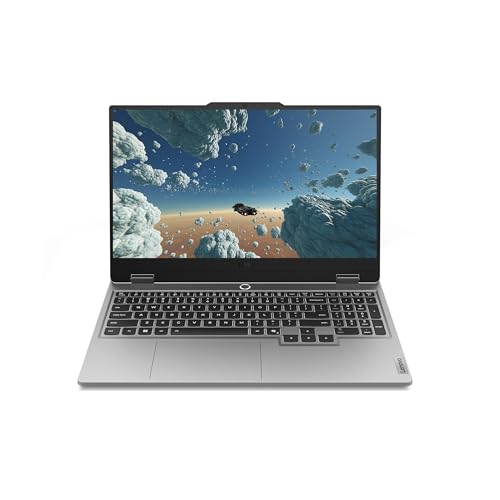 Computer Lenovo Legion LOQ Gaming Laptop (RTX 5050, i7)
A Core i7 plus RTX 5050 laptop with 16GB RAM and a 1TB SSD, a reliable all-around machine for GSPro and E6 Connect.
-
 Accessory Rukket Sports Tri-Turf Hitting Mat Attack
A compact three-surface chipping mat with fairway, rough, and tee sections, a handy add-on for short-game and wedge practice.
Prices update on Amazon and change often. As an Amazon Associate we earn from qualifying purchases at no extra cost to you.
A complete build system for the price of one HDMI cable run
- Room & Space Worksheet + Gear Checklist $14
- Budget Tracker + Launch Monitor Decision Worksheet $14
- Projector & Screen Plan $10
- Wiring & Power Plan $10
- Build Timeline + Maintenance & Calibration Log $12
- Full print-ready planner PDF $12
A single avoided return or rebuild pays for it many times over.
Who this is for
First-time builders who want a clear plan before they buy
Garage, basement, and dedicated-room builds alike
Anyone choosing between launch monitors and budgets
Builders who want to avoid returns and expensive rework
Households where more than one person will use the sim
Budget-minded buyers tracking what the build really costs
30-day money-back guarantee
If the planner does not help you build a better, smarter golf sim, email us within 30 days at [email protected] for a full refund. No hard feelings, and you keep the worksheets.
Frequently Asked Questions
What format are the planner pages in?
Every page is a standalone, print-optimized file plus one combined PDF. Open any worksheet in a browser, hit Print, and you get a clean, professionally formatted page sized for letter paper. No special software needed, and you can save any page as a PDF too.
Can I print the pages more than once?
Yes. Once you purchase, you can print every worksheet as many times as you need: a fresh budget tracker for a second build, extra gear checklists, or copies for whoever is helping you build the room.
Is this a subscription?
No. It is a one-time purchase of $39. You get immediate access to all 8 printable worksheets and the full planner PDF, with no recurring charges, ever.
Does this work for a garage or basement build, not just a dedicated room?
Yes. The room worksheet handles any space, and the fit check flags the usual garage and basement problems like low ceilings and tight depth, with the workarounds. Whether you are building in a two-car garage, a basement corner, or a dedicated room, the same worksheets size to your space.
Will it help me pick a launch monitor?
That is exactly what the Launch Monitor Decision Worksheet is for. It walks you through photometric versus radar, the data points that matter to you, your room and lighting constraints, and your budget, then scores a shortlist so you buy the right unit for your setup instead of overspending or under-buying.
Is this useful if I am just starting to plan?
Yes. Planning is exactly when it pays off most. The room worksheet, budget tracker, and timeline give first-time builders a clear path from empty space to first swing, so you order the right gear in the right order and avoid the expensive mistakes.
Does the planner cover safety?
Every relevant page bakes in the essentials: respect your ceiling and swing clearance, follow mounting and electrical instructions, and hire a licensed electrician or contractor for anything beyond your comfort. The figures are planning estimates, so always measure your own space and confirm specs with the manufacturer. It is practical guidance, not a substitute for professional installation.
What if I need help using the planner?
Email us at [email protected] and we will help you get set up. The download page also includes a quick-start guide and links to the matching free calculators on the site.
Build it with a plan, not a guess
One purchase. Eight printable worksheets plus the full planner PDF. The calm, organized way to take your golf sim from empty room to first swing.
Get the Planner for $39Secure checkout via Stripe. Instant access after purchase. 30-day guarantee.