Golf Simulator Cost Breakdown: What You'll Really Spend
A component-by-component golf simulator cost breakdown for 2026: launch monitor, screen, mat, projector, and frame, plus budget, mid-range, and premium build totals.
A home golf simulator costs roughly $2,000 at the budget end, $5,000 to $12,000 for a comfortable mid-range room, and $20,000 or more for a premium build. The single biggest variable is the launch monitor, which can swing from a few hundred dollars to twenty-five thousand all by itself. Everything else, the impact screen, hitting mat, projector, computer, and enclosure frame, is far cheaper and easier to upgrade later. This guide breaks down each component with real price ranges, then stacks them into three complete build totals so you can see exactly where your money goes.
Before you price anything, confirm your space. Ceiling height and room depth decide which monitor type and screen size will actually fit, and they can quietly add cost if you need to relocate the build. Run your numbers through our golf sim room size calculator first, then use the golf sim cost calculator to total a build as you read.
The main line items to buy
The four purchases that drive most of a build's cost, at sensible mid-budget price points.
-
 Launch monitor Garmin Approach R10 Portable Golf Launch Monitor
The budget end of the biggest line item: radar club and ball data for well under $500.
-
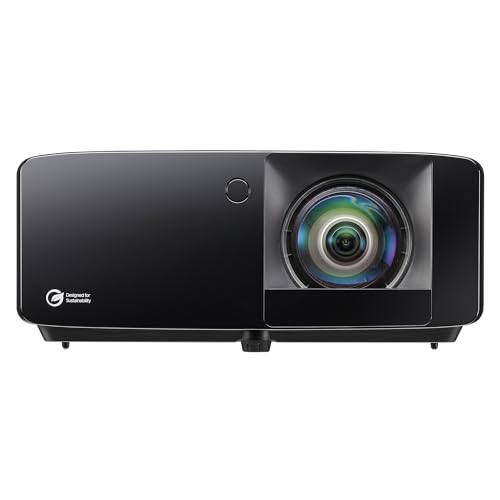 Projector Optoma GT2400HDR Short Throw Laser Projector
Golf-ready 1080p laser with a short throw ratio, a mid-tier projector that mounts close and clears your swing.
-
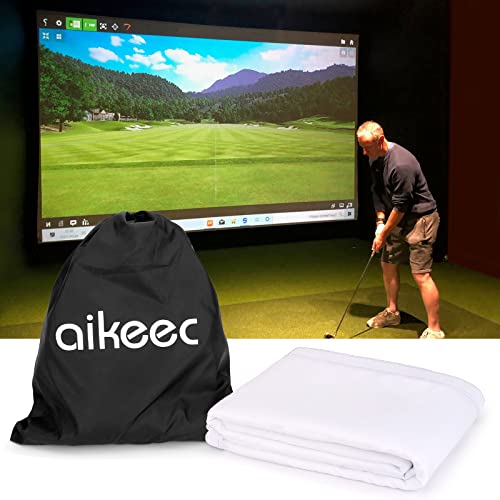 Impact screen aikeec 7mm Thickened Impact Screen with Grommets
Budget DIY impact panel with reinforced grommets for builders framing their own enclosure and tensioning the screen.
-
 Hitting mat Real Feel Golf Mats Country Club Elite 4'x5' Golf Mat
Commercial-grade mat that lets the club pass through the shot, a spend-more line since every shot lands on it.
Prices update on Amazon and change often. As an Amazon Associate we earn from qualifying purchases at no extra cost to you.
Component-by-component price ranges
A simulator is really six purchases: the launch monitor, the impact screen, the hitting mat, the projector, the computer, and the enclosure or net. Here is what each typically costs in 2026.
Launch monitor: $300 to $25,000 (the biggest line)
This is where most of your budget lives, and it is the one component you should research hardest. Launch monitors split into two families. Radar units like the Garmin R10 and FlightScope Mevo+ track the ball in flight using doppler radar and need several feet of ball travel to read accurately. Photometric units like SkyTrak, Bushnell Launch Pro, and Foresight GCQuad photograph the ball at impact and need less depth but better lighting. Roughly: the Garmin R10 runs $500 to $600, a SkyTrak+ lands near $3,000, a Bushnell Launch Pro is $2,000 to $4,000 depending on subscription, and pro systems like GCQuad or Trackman reach $15,000 to $25,000. Be honest about budget unit tradeoffs: the R10 is excellent value but less precise than a $3,000 photometric unit, especially on short shots and spin.
Impact screen: $150 to $900
The screen catches the ball and shows your projected image. A loose hitting panel starts near $150, while a tensioned, multi-layer impact screen built into a frame runs $300 to $900. Spend here if you want a sharp image and a quiet, durable ball stop. Our best impact screens guide compares the options.
Hitting mat: $150 to $1,200
A good mat protects your joints and your floor, and a cheap one will leave your wrists aching. Entry foam-backed mats start around $150, mid-range commercial-grade mats run $300 to $600, and premium hybrid turf systems reach $1,200. This is a spend-more line: every shot you hit lands on it. See our best golf hitting mats guide for picks.
Projector: $500 to $2,500
A short-throw projector that clears your swing and avoids casting shadows is the practical choice. Budget short-throw units start near $500, with brighter, sharper 1080p and 4K models running $900 to $2,500. Throw distance and brightness matter more than headline resolution. Check our best golf simulator projectors guide and the projector throw calculator before buying.
Computer: $0 to $2,000
Some monitors run on a phone or tablet you already own, so this line can be zero. If your software needs a real machine, GSPro and TGC want a dedicated gaming PC with a capable graphics card, typically $800 to $2,000. See our best golf simulator computers guide for spec targets.
Enclosure or net: $200 to $3,000
A simple hitting net costs $200 to $400 and is the cheapest way to start. A full enclosure with frame, side baffles, and ceiling padding runs $700 to $3,000. You can save big here by building a frame from EMT conduit. Our best enclosures guide covers both routes.
Budget, mid-range, and premium build totals
Stacking real components into complete builds shows how the launch monitor drives the total. These are representative 2026 estimates; prices move, so confirm yours in the cost calculator.
| Component | Budget (~$2k) | Mid-range ($5k to $12k) | Premium ($20k+) |
|---|---|---|---|
| Launch monitor | Garmin R10 ($550) | SkyTrak+ ($3,000) | GCQuad / Trackman ($15,000 to $25,000) |
| Screen / net | Hitting net ($300) | Impact screen ($500) | Premium tensioned screen ($900) |
| Hitting mat | Foam-backed ($200) | Commercial mat ($500) | Hybrid turf system ($1,200) |
| Projector | Phone/tablet ($0) | Short-throw 1080p ($900) | 4K short-throw ($2,000) |
| Computer | Existing device ($0) | Gaming PC ($1,200) | High-end PC ($2,000) |
| Enclosure / frame | Net included | DIY EMT enclosure ($700) | Full enclosure ($3,000) |
| Approx. total | ~$2,000 | $6,800 to $11,000 | $22,000 to $33,000 |
For a side-by-side reference you can cite, see our golf sim cost chart, which lays out the same tiers in a printable format.
The budget build (~$2,000)
A Garmin R10, a quality net, a foam-backed mat, and a phone or tablet running the bundled app gets you practicing for about $2,000. You skip the projected image, so it is more practice tool than living-room showpiece, but the data is genuinely useful and you can bolt on a screen and projector later without touching the monitor.
The mid-range build ($5k to $12k)
This is the sweet spot for most home golfers. A SkyTrak+ delivers near-pro accuracy at a fraction of pro pricing, a tensioned impact screen and short-throw projector give you a sharp, immersive image, and a DIY enclosure keeps the frame cost down. A dedicated gaming PC unlocks GSPro and its huge course library. Most buyers in this range land between $6,800 and $11,000.
The premium build ($20k+)
Premium means a pro-grade photometric monitor like a Foresight GCQuad or a radar flagship like Trackman, paired with a 4K projector, a hybrid turf hitting surface, and a fully padded commercial enclosure. The accuracy and build quality are exceptional, but understand that the monitor alone is 70 to 80 percent of the spend. Most home golfers do not need this tier to improve.
Where to save, and where not to
- Save on the enclosure frame. EMT conduit and printed connectors build a sturdy frame for a fraction of a branded kit. The frame does not affect shot data.
- Save on the computer if your software allows it. Many monitors run on a tablet. Only buy a gaming PC if GSPro or TGC requires it.
- Save modestly on the projector. A mid-priced short-throw unit looks great. You do not need the brightest 4K model for a dedicated, light-controlled room.
- Do not skimp on the launch monitor. It is the heart of the system and the hardest part to upgrade cleanly. Buy as much accuracy as your budget allows.
- Do not skimp on the hitting mat. A harsh mat causes wrist and elbow pain that will end your sessions early. Comfort here pays for itself.
- Do not skimp on the impact screen if you project. A cheap screen is loud, wrinkles, and wears through. A quality tensioned screen is quieter, sharper, and lasts.
The honest takeaway: decide your launch monitor tier first, because it sets your entire budget. From there, a comfortable mat and a good screen matter more to your daily experience than chasing the brightest projector or the fanciest frame. Run your exact components through the golf sim cost calculator to lock in a number before you buy.
Golf Sim Build Planner
Room-fit worksheet, gear checklist, budget tracker, and wiring and lighting plan, in one printable planner that takes your build from idea to first swing.
Frequently Asked Questions
How much does a golf simulator cost?
A home golf simulator runs anywhere from about $2,000 to well over $20,000. A budget setup built around a Garmin R10 and a net lands near $2,000. A mid-range room with a SkyTrak, projector, and proper enclosure usually totals $5,000 to $12,000. Premium builds with a Bushnell Launch Pro, GCQuad, or Trackman climb past $20,000. The launch monitor is almost always the single largest line item in any build.
What is the most expensive part of a golf simulator?
The launch monitor. It is the device that reads your ball and club data, and accuracy scales steeply with price. Budget radar units like the Garmin R10 cost a few hundred dollars, mid-tier photometric units like SkyTrak run $2,000 to $3,000, and pro-grade systems like GCQuad or Trackman cost $15,000 to $25,000. Everything else, the screen, mat, projector, and frame, is comparatively affordable and far easier to upgrade later.
Can you build a golf simulator for under $2,000?
Yes, if you keep the launch monitor budget-friendly and hit into a net instead of a projected screen. A Garmin R10 plus a quality hitting net, a foam-backed mat, and a phone or tablet for the app gets you swinging for roughly $1,500 to $2,000. You lose the immersive projected image and some data accuracy, but it is a legitimate practice and play setup. You can add a screen and projector later without replacing the monitor.
Is it cheaper to build your own golf simulator or buy a package?
Building piece by piece is usually cheaper and lets you match each component to your room and budget. Packages from SkyTrak, Carl's Place, and others bundle a monitor, screen, mat, and frame at a small premium for the convenience and guaranteed compatibility. Packages make sense if you want one box and one warranty. A custom build wins on price and flexibility if you are willing to research compatibility yourself.
What ongoing costs should I budget for after the build?
Plan for software subscriptions, hardware wear, and the occasional upgrade. GSPro runs about $250 per year and E6 Connect has annual tiers, while many monitors include a usable free app. Hitting mats and impact screens wear out with heavy use and need replacing every few years. Add a modest electricity cost for the projector and PC. Budget $200 to $400 per year for a moderately used home simulator.
Where should I spend more and where can I save?
Spend on the launch monitor and the hitting mat, since accuracy and joint comfort affect every shot you hit. Save on the enclosure frame, which you can build from EMT conduit or PVC, and on the computer if your software runs on modest hardware. A budget projector is a reasonable compromise, but do not cut corners on the impact screen if you want a sharp, durable image and a quiet, safe ball stop.
Building a golf sim?
Use our free calculators and guides to size the room, the gear, and the budget.
Build Planner: $39